RxShift
Register
Built from real pharmacy experience

Pharmacy scheduling made simple

RxShift was originally created for pharmacy employee scheduling. Spend less time building rotas and more time caring for patients, supporting your team and running your pharmacy.

The scheduling tool that started with pharmacy teams

RxShift began with a simple goal: make pharmacy scheduling easier for owners and managers who understand that every shift affects patient service, workflow and team coverage.

Organize the pharmacy at a glance

Use separate Team sections to create dedicated schedule views for pharmacists, technicians and floor staff. This keeps each group easy to understand while giving owners one central place to manage the whole pharmacy.

  • Keep pharmacist schedules separate from technician schedules.
  • Create a dedicated view for front-store or floor staff.
  • Manage one pharmacy or organize multiple locations with clear, separate schedule views.
  • Plan one to four weeks at a time with unlimited forward planning.
  • Print a professional schedule for the dispensary, staff room or management office.
Example: A pharmacy owner can view pharmacists, technicians and floor staff separately, without losing the ability to manage the entire operation from one account.

RxShift pharmacy scheduling screen

Be a pharmacist first, not a scheduler all day

Pharmacy owners and pharmacists often become managers because they care deeply about their team and patients—not because they want to spend hours formatting schedules.

RxShift reduces the repetitive work involved in building and updating schedules. Copy a previous week, reuse a template, move shifts with drag and drop, and make changes directly in the weekly view. The result is a schedule that is faster to prepare and easier for everyone to understand.

⏱️

Save management time

Spend less time repeating the same scheduling tasks every week.

🧑‍⚕️

Stay focused on patients

Keep your attention on clinical services, counselling and pharmacy operations.

📆

Plan ahead easily

Prepare future weeks without being limited to a single schedule.

Example: Instead of spending Sunday evening rebuilding next week's rota, a pharmacist-manager can copy the previous schedule, adjust availability changes and return to patient-focused work.

A flat rate that works for part-time pharmacy teams

Pharmacies often rely on many part-time technicians, including students who work only a few shifts each week.

Schedule your whole team without per-employee pricing

With a flat monthly rate, RxShift is especially practical for pharmacies with a large part-time team. You can add the people needed to cover your shifts without watching a per-user fee grow every time you add a student technician or occasional employee.

  • Manage full-time pharmacists alongside part-time technicians.
  • Handle non-constant schedules and changing weekly availability.
  • Keep employee lists organized by pharmacy location or team.
  • Archive inactive employees without losing historical records.
Example: A pharmacy with two full-time pharmacists and twelve student technicians can schedule the entire team at one predictable monthly price.
RxShift pharmacy employee management screen

Make changing pharmacy availability easier to manage

Part-time employees often have changing class schedules, second jobs, family responsibilities or seasonal availability.

Let employees provide the information you need

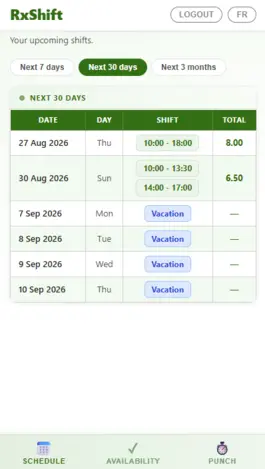
Through the Employee Portal, technicians and other staff can view their schedules and submit their availability. Managers receive useful information before building the next schedule instead of collecting availability through scattered text messages.

  • Employees can view upcoming pharmacy shifts from their phone.
  • Student technicians can submit availability around their classes.
  • Managers can see availability while creating the schedule.
  • Reduce back-and-forth messages and scheduling misunderstandings.
Example: A student technician submits the times they can work next month. The pharmacy manager can then build coverage around real availability instead of guessing.
RxShift employee portal for pharmacy staff

Add the clock-in system your pharmacy needs

Some pharmacy banners do not offer owners a clock-in and clock-out system. RxShift makes this capability available as an optional Punch Out System.

Employees can punch in and out from a shared kiosk at the pharmacy or from the Employee Portal, depending on how your team works. Managers can then generate timesheet reports to review recorded punches and total working time.

🖥️

Pharmacy kiosk

Place a tablet or computer near the staff entrance for quick employee punches.

📱

Portal punch

Let employees punch in and out from their own device when enabled.

📊

Timesheet reports

Review recorded punches and generate a practical timesheet report.

Example: A pharmacy can use a shared kiosk for technicians arriving at the dispensary while managers review the resulting timesheet report at the end of the pay period.

Make pharmacy scheduling easier today

Spend less time managing schedules and more time supporting your patients and pharmacy team.

Create your account